shape.phonemes
Integrates a comprehensive bank of phoneme poses and variations into the facial rig.
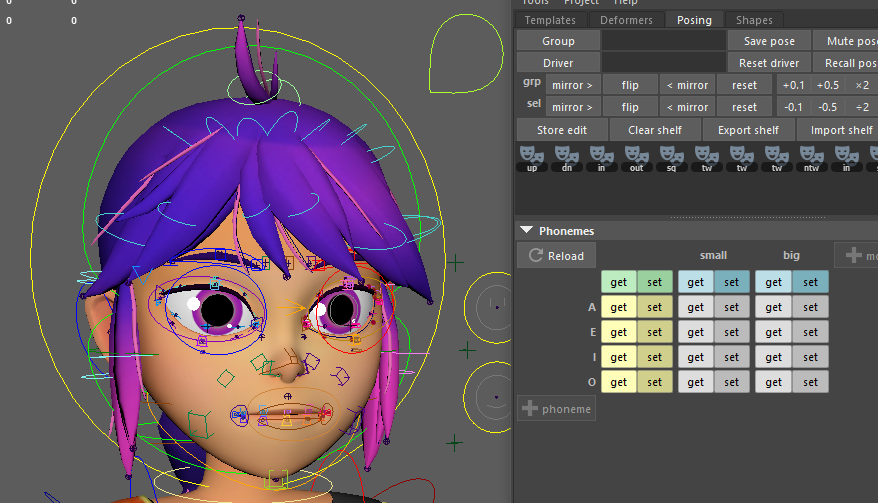
Because defining dozens of phonemes and their variants (modes) across hundreds of facial shapes requires a massive amount of data, this modifier is not meant to be written by hand. Instead, it is automatically generated by Mikan's Posing tool (found in the main UI under the Posing tab > Phonemes organ).
This modifier takes that generated pose bank and constructs the necessary math nodes (expressions and blend nodes) to dynamically mix these shapes based on a set of generated attributes.
Usage
To properly initialize and build the phoneme system, follow this step-by-step UI workflow:
1. Initialization
If the template does not yet contain a shape.phonemes modifier, the UI will only display an "Add Phonemes" button. Clicking it will inject the following hardcoded base snippet into your template:
shape.phonemes:
  mod: [ ]
  pho: [ ]
  poses: { }
  src:
    - chan_face::node
2. Configuring Sources (src)
Before recording any poses, you must verify and configure your src list in the YAML. This tells the UI which nodes to scan when you click the "get" button. By default, it scans the main facial channel buffer.
It is highly recommended to add the facial controllers to this list so you can record precise, controller-driven micro-tweaks for specific phonemes without needing dedicated global shapes:
src:
  - chan_face::node
  - face:::ctrls
:::)Notice the three colons (:::) in face:::ctrls. In Mikan, a double colon (::) targets exact matches within a module. A triple colon (:::) is a recursive search: it targets all of the child controllers within the face module and its sub-modules, ensuring no controller tweak is missed during recording.
3. Building the Grid
Once your sources are set, use the "+ phoneme" and "+ mode" buttons in the Mikan UI to build your matrix.
- Phonemes (Rows): The base sounds (e.g., A, E, I, O).
- Modes (Columns): The variations of those sounds (e.g., small, big).
4. Recording Poses (Get / Set)
The UI generates a grid of get and set buttons for every combination.
- Pose your character in the viewport.
- Click
geton the corresponding cell to capture the values from yoursrcnodes and save them to theposesdictionary. - Click
setto recall a saved pose back to the rig for further editing.
Phoneme recording in Mikan is cumulative. To output a specific phoneme, the system adds the values of the neutral/base pose to the values of the requested phoneme.
- Consequence 1: If you modify the neutral base pose later, it will affect all other phonemes.
- Consequence 2: The same applies to modes (e.g., modifying the neutral
bigmode will alter all phonemes utilizing thebigmode).
Smart Controller Rerouting
A major feature of this modifier is its non-destructive nature. If the pose bank contains data targeting an animation controller (tagged with ::ctrls), the modifier will intercept this and automatically reroute the connections to the controller's underlying poses buffer node.
Benefit: The animation controllers remain completely free and unlocked. Animators can dial in a phoneme and still manually tweak the controllers on top of it.
Parameters
| Parameter | Type | Default | Description |
|---|---|---|---|
create | bool | off | If on, creates a dedicated transform node named phonemes under the current node to host the attributes. If off, attributes are added directly to the modifier's target node. |
src | list[id] | UI Directive: A list of nodes (e.g., chan_face::node, face:::poses) that the Mikan UI tool will scan to capture and save the poses. | |
pho | list[str] | List of the base phoneme names (e.g., A, E, I, O). | |
mod | list[str] | List of mode variants (e.g., small, big, wide). | |
poses | dict | The massive dictionary containing the captured values for every plug across every phoneme and mode. Generated by the UI. |
Output Attributes
When executed, the modifier generates a specific set of animatable attributes on the target node (or the newly created phonemes node) to drive the lipsync:
@phonemes(0 to 1): The master weight/envelope for the entire phoneme system.@pho_closed(0 to 1): The hardcoded resting/closed state.@pho_<name>(0 to 1): Individual weights for each phoneme defined in thepholist.@mod_<name>(0 to 1): Individual weights for each mode defined in themodlist.
The system uses mathematical expressions to dynamically multiply these weights together (master * phoneme * mode) and blend the resulting values into the rig.
Example
Note: This is a truncated structural example. A real poses dictionary generated by the UI will contain hundreds of entries.
shape.phonemes:
  create: on
  mod: [ small, big ]
  pho: [ A, E, I, O, U ]
  src:
    - chan_face::node
    - face:::poses
  poses:
    # Example of the neutral mode for phoneme 'A'
    A:
      null:
        chan_face::node.m_jaw_open: 0.5
        chan_face::node.m_lip_funnel: 0.2
    # Example of the 'big' mode for phoneme 'A'
    A:
      big:
        chan_face::node.m_jaw_open: 0.8
        chan_face::node.m_lip_funnel: 0.4