world.character
Generates the standard global world and root control structure for character assets.
world.character serves as the foundational base for all character rigs. It sets up top-level animation controls, top-level spaces, global scaling logic, and structural hooks needed to parent and organize downstream modules (spine, limbs, props, etc.).
This module sets up:
- A consistent global hierarchy shared across all characters
- The standard world / move (root) control structure
- Default spaces used by all other modules (arms, legs, spine, etc.)
- A stable entry point for animation tools, exporters, and space-switch systems
All other modules (spine, limbs) are built on top of this structure.
Structure
The world.character template is intentionally simple:
- The root joint defines the global position of the rig.
- No joint orientation is required, orientation is handled automatically.
- After the rig is built, all other modules are parented under the world hierarchy.
Despite its simplicity, this module is essential for maintaining compatibility across the entire animation pipeline.
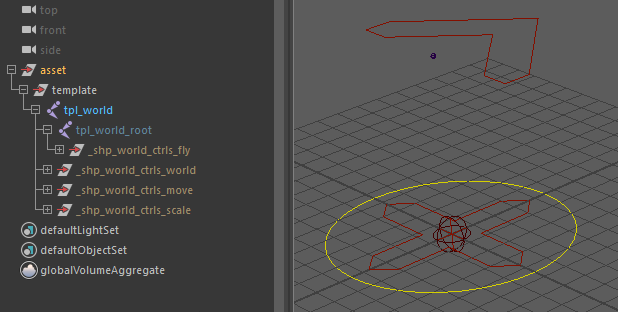
Placing the Template Pivot
When configuring the template guide in the viewport, the root guide serves as the positioning reference for the Fly control (c_fly).
- Place the
rootguide at the character’s center of mass or balance center (e.g., around the mid-torso / pelvis level). - This position establishes the pivot point used by animators when making the character float, jump, or rotate freely in air.
Parameters
| Parameter | Type | Default | Description |
|---|---|---|---|
fly_ctrl | bool | on | Enables the Fly controller (c_fly) at the template root position for aerial maneuvers. If off, hooks.root defaults to following c_move directly. |
scale_ctrl | bool | on | Enables the Scale/Squash control (c_scale) with dynamic pivot placement and volume preservation. |
Outputs
Generated Hierarchy (Build)
Depending on the selected options, the final generated hierarchy follows this logical structure:
c_world
└── c_move
    ├── [c_scale] (if scale_ctrl: on)
    │   └── [c_fly] (if fly_ctrl: on)
    │       └── hooks.root
    └── hooks.world
(Note: If c_fly or c_scale are disabled, hooks.root automatically falls back to parent itself under the closest active parent in this chain, defaulting to c_move.)
Node IDs
Controllers
<id>::ctrls.world: Global world control node (c_world). Includes native uniform global scaling for the entire asset.<id>::ctrls.move: Primary translation/rotation root control (c_move). Can also be used for uniform global placement and scaling on the ground.<id>::ctrls.fly: Aerial/center-of-gravity control (c_fly, only exposed iffly: on).<id>::ctrls.scale: Special scale and squash control (c_scale, only exposed ifscale: on).
Misc.
<id>::space.world: Reference matrix transform for absolute world space.<id>::space.move: Reference matrix transform for move space.<id>::space.root: Reference matrix transform positioned at the character's root offset.
Hooks
<id>::hooks.world: Maps directly to the mainc_worldnode. Use this hook when downstream modules (e.g., ground target locators, global props, UI elements) should remain fixed in absolute world space.<id>::hooks.root: Maps to the generatedhook_rootmatrix transform following the character's local animated root (loc_fly). Modules that form the character's body (spine, legs, head targets) should be attached to this hook so they follow afterc_flyandc_move.
Usage & Control Mechanics
Character Controls Overview
c_world(World): The master parent node. Translating or rotating this control moves the entire character rig setup in absolute world space.c_move(Move): The main ground-level character control. Used to position and orient the character on the ground plane.c_fly(Fly): Positioned at the character's center of gravity (based on theroottemplate guide). It allows animators to rotate and tilt the character in mid-air (jumping, flying, falling) without disturbing the ground trajectory defined byc_move.c_scale(Scale / Squash): A dedicated controller designed for localized deformative scaling and flexible squash-and-stretch setups.
Understanding c_scale Mechanics
Unlike standard root controls (c_world / c_move) which scale the character globally, c_scale is a special utility control designed for dynamic animation manipulation (such as ball squashes, impact deformation, or localized stretching).
Free Pivot Relocation
c_scale can be translated freely anywhere in space without moving the character's geometry or child hierarchy.
- Internal reverse-matrix setups neutralize the translation of
c_scaleon the child elements. - This allows animators to align
c_scaledirectly to any contact surface (e.g., placing the pivot at the contact point on the floor during an impact) and scale/squash the character directly from that specific contact point.
Automatic Squash & Volume Preservation (squash)
The c_scale controller includes a custom squash attribute (0.0 to 1.0):
- When scaling
c_scalenon-uniformly (e.g. stretching vertically along Y), settingsquashto1.0automatically applies an volume-preserving inverse scale along the perpendicular axes (X and Z). - Lowering
squashdown to0.0disables volume preservation, allowing free non-uniform scaling.
Space Switch (follow_world)
c_scale exposes a follow_world slider (0.0 to 1.0):
0.0(Default): c_scale follows the local transformations ofc_flyandc_move.1.0: Blends the position and orientation ofc_scaleback into absolute world space. This lets animators keep the squash pivot fixed at a specific point in the environment while the character moves through it.
Rigging & Scene Attachment Workflow
When building a full character rig, world.character must be built first to establish the global hook targets.
Hook Selection Guidelines
When attaching subsequent template modules:
- Parent to
hooks.root: Attach body modules (Spine, Pelvis, Legs, Arms, Head) tohooks.root. This ensures that translatingc_moveor pivotingc_flycarries the entire character naturally. - Parent to
hooks.world: Attach world-space targets, ground locators, or items that need to ignorec_moveandc_flymotions directly tohooks.world.