Adding Modifiers
Now that the hierarchy is in place, we move on to the most interesting part: adding all the mechanics with the modifiers.
Reminder: in Mikan, we do not use direct constraints in Maya. We use modifiers, which are instructions read by Mikan during the rig build. This keeps the template clean and flexible.
Visibility groups
Let's start with simple modifiers to add visibility groups to the facial-rig controllers.
Groups in the hierarchy gather controllers for select/mirror/flip, but they do not create visibility menus.
So we add a helper node named _face_vis on the face group, then a group modifier to create the visibility menus.
[mod]
# -- facial visibility groups
#?neck::ctrls.head

group:
  vis: neck::ctrls.head
  nodes:
    - face:::ctrls
  tag: vis.face

group:
  vis: neck::ctrls.head
  nodes:
    - mouth1*::ctrls
    - mouth2*::ctrls
    - mouth3*::ctrls
    - mouth4*::ctrls
  tag: vis.mouth

group:
  vis: neck::ctrls.head
  nodes:
    - lip1*::ctrls
    - lip2*::ctrls
    - lip3*::ctrls
    - lip4*::ctrls
  tag: vis.lips

group:
  vis: neck::ctrls.head
  nodes:
    - cheeks:::ctrls
  tag: vis.cheeks
A few important points to keep in mind when working with controller groups:
The command #?neck::ctrls.head ensures that the block only executes if the specified object exists. At first glance, it may seem unnecessary, but it becomes very useful when you want to reuse or extend this template for different characters, allowing you to safely run commands without affecting other rigs that may not share the same hierarchy.
Another option is to declare a variable like that: #>ctrl: neck::ctrls.head. This lets you replace all occurrences of this controller in the block with <ctrl>, making it easy to edit all commands at once using a single variable.
The triple-colon notation in face:::ctrls is used to select the group and all of its children. Using face::ctrls (double colon) would select only the direct members of the face group, but in our setup, the face group itself contains no controllers. Extending the selection with ::: ensures that all controllers within the hierarchy are included in the operation.
Skull hooks
We now move on to the constraints used to deform the skull. The goal here is to allow the face to bend and adapt as the upper and lower parts of the head move independently. To achieve this, we define two constraint targets: skull for the upper part of the head, and jaw_up for the lower part.
The actual constraint is created using the hook modifier, which internally works as a matrix-based constraint. This allows skull_mid to interpolate cleanly between its two parents and provides a stable foundation for flexible head deformation.
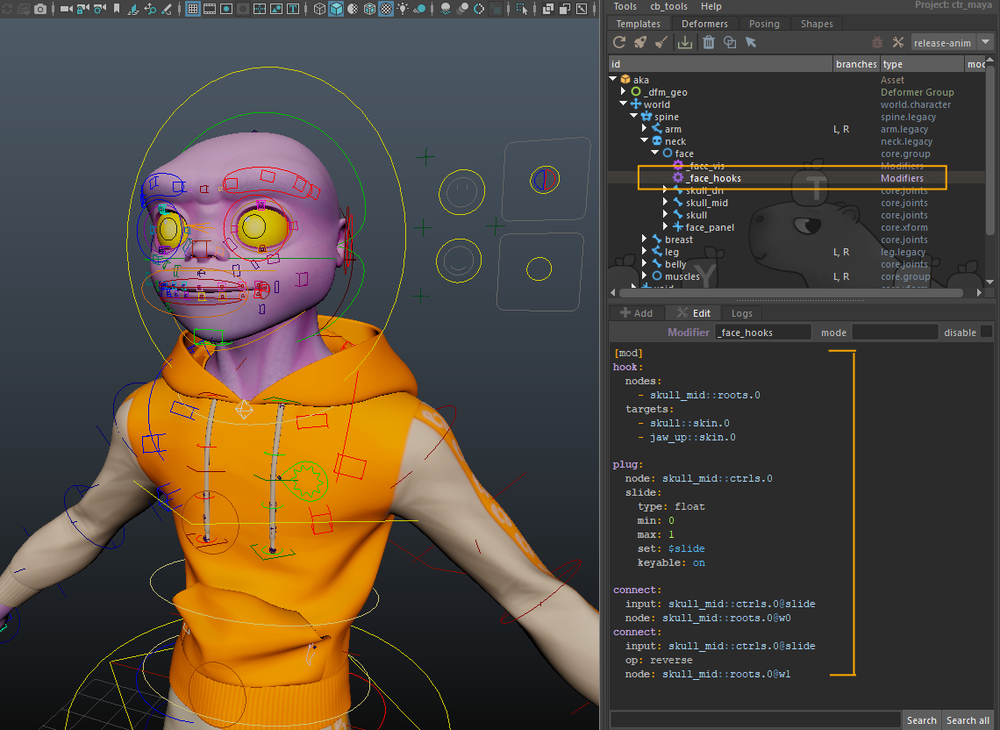
To do this, create a helper node named _face_hooks on the face group and add the following commands:
[mod]
# -- skull mid hooks
hook:
  nodes:
   - skull_mid::roots
  targets:
   - skull::skin.0
   - jaw_up::skin.0
  self: on
For cartoon rigs in particular, it is often useful to give animators control over how malleable the middle of the face is. Depending on the shot, you may want the mid-face to follow the skull rigidly, follow the jaw more closely, or blend between the two. To support this, we add a blend control on the constraint weights.
Using the plug command, we add an animation attribute to the skull_mid controller. The hook modifier creates two weight attributes, w0 and w1, corresponding to the two constraint targets. By default, both weights are set to 1. We then connect the animator-facing slider so that a value of 0 drives w0 to 1 and w1 to 0, and a value of 1 does the opposite. This effectively allows the animator to switch, or smoothly blend, the parent influence between skull and jaw_up.
This setup gives direct artistic control over mid-face deformation while keeping the underlying rig structure simple and predictable.
plug:
  node: skull_mid::ctrls.0
  slide: {k: on, min: 0, max: 1, set: $slide}

connect:
  input: skull_mid::ctrls.0@slide
  node: skull_mid::roots.0@w0
connect:
  input: skull_mid::ctrls.0@slide
  node: skull_mid::roots.0@w1
  op: reverse
Mouth
Hooks
We can now move on to the mouth deformation rig. In this section, we install the system that allows the jaws to drive the lip controllers and the various mouth tweakers that shape the deformation.
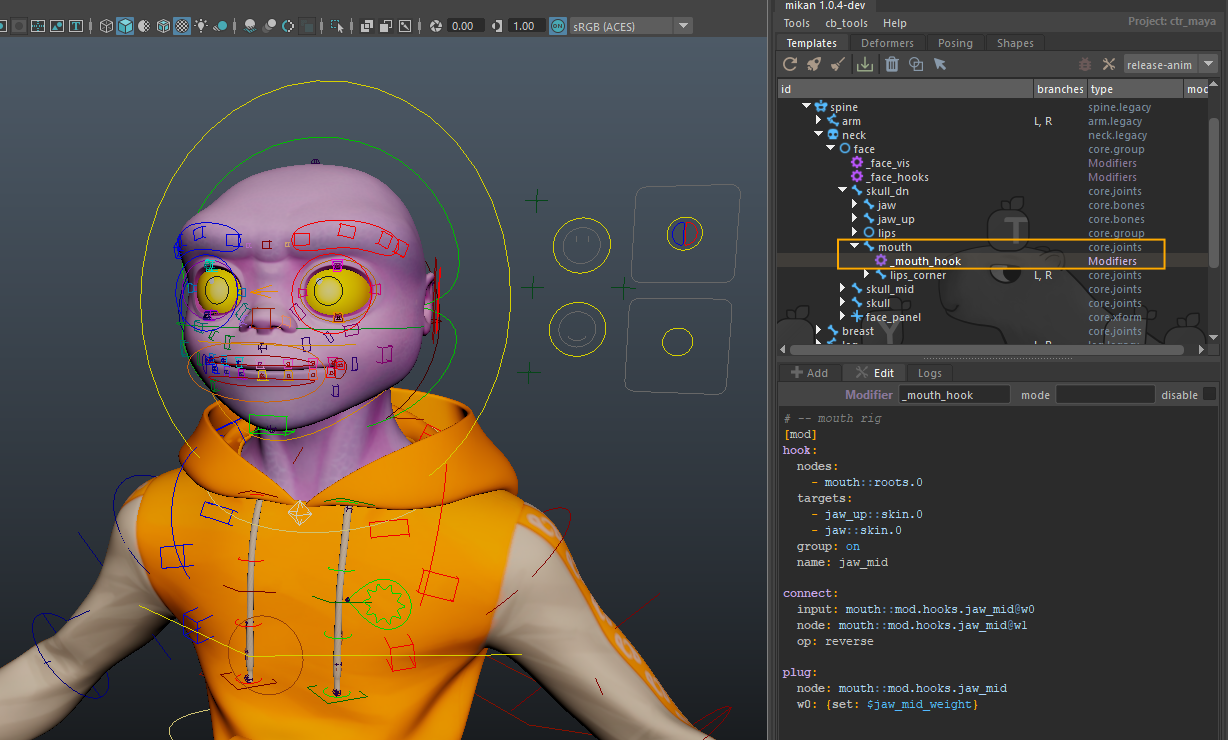
We start by constraining the main mouth controller between jaw and jaw_up using a hook modifier, following the same approach used earlier with skull_mid. As before, we add a switch on this controller to define how it is attached by default, allowing us to blend or switch its parent influence.
In addition, we introduce an adjustable variable on the helper node. This variable can be used directly inside the command, making it possible to expose only the default switch value to the artists responsible for assembling the rig, without requiring them to dig into the command logic.
To do this, we simply declare a $variable in the command in place of a numeric value. The rig builder will automatically look for the corresponding attribute named gem_var_variable on the helper node. If the attribute does not exist, it will be created automatically and initialized to 0.
This approach keeps the commands flexible while making default behavior easy to adjust at build time.
Create a helper node named _mouth_hook under mouth module and add the following commands:
[mod]
# -- mouth rig
hook:
  nodes: mouth::roots.0
  targets:
    - jaw_up::skin.0
    - jaw::skin.0
  group: on
  name: jaw_mid

connect:
  input: mouth::mod.hooks.jaw_mid@w0
  node: mouth::mod.hooks.jaw_mid@w1
  op: reverse

plug:
  node: mouth::mod.hooks.jaw_mid
  w0: {set: $jaw_mid_weight}
Lips rechain
Now that the mouth controller is properly constrained, we can see that the main lip controllers (lip_up, lip_dn) and the mouth corners (lips_corner.L, lips_corner.R) do not automatically follow it. A straightforward solution would be to parent everything directly under mouth, but that would be too limiting. In practice, we want lip_up and lip_dn to continue following their respective jaws, while still being influenced by the global mouth control.
To achieve this, we introduce the concept of a virtual hierarchy using the rig.rechain modifier. This modifier can be a bit unintuitive at first, but once properly understood, it becomes a very powerful tool.
The idea is simple: the physical hierarchy remains driven by the jaws, while an additional virtual parent allows the lips to inherit motion from the mouth controller.
We first create a helper node to host all commands related to the lip rig. This helper is parented under the lips group and named _lips_rig.
We then add commands to parent lip_up under jaw_up and lip_dn under jaw. This ensures that each lip controller follows its corresponding jaw by default. Once this physical hierarchy is in place, we use rig.rechain to make both lip controllers also follow the mouth controller, effectively inserting it as a virtual parent.
This is also a good opportunity to introduce the notion of execution priority. The build process does not strictly follow a deterministic order based on hierarchy. While parent-child relationships define dependencies, the order in which sibling nodes are parsed cannot be guaranteed. When a specific sequence is required, timing offsets must be used to enforce it.
In this case, we want to make sure that all constraint-related setup for the lips has already been built before applying the rechain logic. We therefore delay execution slightly using #!-10.
The resulting setup allows the lips to correctly inherit motion from both the jaws and the global mouth controller, without compromising the underlying hierarchy.
[mod]
# -- lip up/dn rechain
#!-10
parent: lip_up::roots.0 jaw_up::skin.0
parent: lip_dn::roots.0 jaw::skin.0

rig.rechain:
  roots:
   - mouth::roots.0
  ctrls:
   - mouth::skin.0
  nodes:
   - lip_up::roots.0

rig.rechain:
  roots:
   - mouth::roots.0
  ctrls:
   - mouth::skin.0
  nodes:
   - lip_dn::roots.0
Lip tweakers hooks
For the lip deformation rig, we now focus on how the mouth segmentation controllers follow the main mouth and lip controls.
The first step is to constrain all mouth tweak controllers to the global mouth controls. This is done using hook modifiers, with a specific weight assigned to each controller to control how much it follows. To keep the setup efficient, we group several tweak controllers under a single hook modifier whenever possible, instead of computing identical constraints multiple times.
On the same helper node, we add modifiers to hook the mouth* controllers, exposing weight attributes that control how each segment blends between mouth and lip_up / lip_dn.
The intended behavior is as follows:
mouth1fully follows the lips,mouth5follows only the mouth controller,- intermediate controllers use progressively interpolated weights.
This creates a smooth and coherent deformation along the entire mouth line, allowing global mouth motion and local lip articulation to blend naturally.
At this stage, we introduce the notion of loops, which allows a set of commands to be duplicated automatically using list-based variables. This is especially useful when you need to apply similar connections or constraints to multiple elements without repeating the same code over and over.
To do this, we declare a variable at the beginning of the command block using the #> syntax, for example: #>v: [0, 1, 2, 3].
When a variable is defined as a list, any modifier that references it using <v> will be executed once for each value in the list.
A declared variable does not have to be a list to be useful. If the variable contains a single value, it can still be referenced in the modifiers in exactly the same way. In that case, the commands are executed only once, but you still benefit from having a single entry point to configure a whole set of modifiers.
This is particularly convenient when you want to parameterize a group of commands internally, without exposing it to an attribute. It lets you adjust indices, limits, or special cases in one place, while keeping the rest of the block generic and readable.
In the following setup, n and side are list-based variables used to generate repeated hooks and connections, while last is a single-value variable used to handle the end controller of the mouth line explicitly. All of this is part of the same rig construction logic, not a separate example.
[mod]
# -- lips up/dn hooks
#>n: [2, 3, 4]
#>last: 5
#>side: [up, dn]

hook:
  node: mouth1_<side>::roots.0
  targets:
   - lip_<side>::skin.0
  group: on
  name: lip1_<side>
hook:
  node: mouth<n>_<side>::roots.0
  targets:
   - lip_<side>::skin.0
   - mouth::skin.0
  group: on
  name: lip<n>_<side>
hook:
  nodes: mouth<last>::roots.0
  targets:
   - mouth::skin.0
  group: on
  name: lip<last>

connect:
  input: lips::mod.hooks.lip<n>_<side>@w0
  node: lips::mod.hooks.lip<n>_<side>@w1
  op: reverse

plug:
  node: lips::mod.hooks.lip<n>_<side>
  w0: {set: $mouth<n>_<side>_weight}
Lips corner pinch
At this stage, a natural question arises: so far, we haven’t actually set the weights for our lip tweak controllers. That’s intentional. We first built the structure and relationships. Now we introduce a global control to adjust the mouth’s behavior.
The shape and opening of the mouth corners are sensitive parameters. They often require fine-tuning during skinning and deformation, and animators may want to tweak them directly during animation too. Rather than hard-coding these values into the rig, we expose a dedicated control that lets you adjust the "corner pinch" of the lips.
This system allows smooth transitions between a highly cartoonish mouth, wide and exaggerated, and a more realistic mouth where corners remain stable, or pinched inward.
We achieve this by adding an animation attribute to the main mouth controller, then using it to drive the weights of the lip tweak hooks. Default weight values remain defined via exposed template variables (with $), while the distribution logic uses the loop variables introduced earlier. Both systems work together seamlessly.
The following block extends the previous exercise:
[mod]
# -- sticky corner switch
#> n: ['2', '3', '4']
#> side: [up, dn]
plug:
  node: mouth::ctrls.0
  corners_pinch: {set: 0, k: on, min: -1, max: 1}

drive:
  node: mouth::ctrls.0@corners_pinch
  lips::mod.hooks.lip<n>_<side>@w0:
    1: $mouth<n>_<side>_weight
    0: $mouth<n>_<side>_weight
    -1: 1

drive:
  node: mouth::ctrls.0@corners_pinch
  lips::mod.hooks.lip3_<side>@w0:
    1: 0
    0: $mouth3_<side>_weight
    -1: 1
Combining lips corner tweakers
The final step of the mouth controller setup is to attach the corner tweakers to the lips_corner controllers. First, we need to reparent the lips_corner under the global mouth controller. In the template, they were placed in the lips group to be associated with animator tools, but for the final rig structure, we need to establish the proper hierarchy. This also shows the flexibility of Mikan: you can move elements in the template without breaking the rig.
Next, we want to virtually reparent the tweakers, mouth4_up, mouth4_dn, and mouth5, to follow the lips_corner while keeping the existing hook weights intact. To do this, we use the rig.rechain modifier, which requires temporary reference objects. Instead of creating additional template modules, we can generate these on the fly using the locator modifier. This is ideal for small helper nodes or groups needed to complete the rig, without cluttering the template hierarchy. If the locator duplicates an existing rig object, this approach works perfectly.
How it works:
- The
locatormodifier generates two reference objects for each tweaker: one for the original position, and one attached to thelips_cornerhook. - The
parentcommand sets the tweaker under the appropriate controllers so the hierarchy exists for the rechain. rig.rechainthen virtually re-parents the tweakers to followlips_cornerwhile preserving the influence of the weighted hooks.
This system allows the corners of the mouth to drive the tweakers without breaking previous lip constraints. It demonstrates the flexibility of Mikan: you can insert helper locators, virtual parents, or control nodes wherever needed, keeping the rig adaptable and maintainable.
To do this, create another helper node named _lips_corner_rig under lips_corner module and add the following:
[mod]
# -- mouth corner rig
#!-20
#> lip: [4_up, 5, 4_dn]

parent:
  - lips_corner::roots.0
  - mouth::hooks.0

# create locators for the original and destination positions
locator:
  node: mouth<lip>.L::ctrls.0
  parent: mouth::skin.0
  name: orig_mouth_<lip>

locator:
  node: mouth<lip>.L::ctrls.0
  parent: lips::mod.hooks.lip<lip>
  name: mouth_<lip>

# parent the tweaker under the lips_corner controller
parent:
  - mouth<lip>.L::roots.0
  - lips_corner.L::skin.0

# use rig.rechain to create a virtual hierarchy
rig.rechain:
  roots:
   - lips_corner.L::mod.loc.orig_mouth_<lip>
  ctrls:
   - lips_corner.L::mod.loc.mouth_<lip>
  nodes:
   - mouth<lip>.L::roots.0
Sticky lips
We start by creating the sticky attributes on shp_lips, which will later be connected to chan_face for animator access.
[mod]
# -- sticky lips settings
#!10

plug:
 m_sticky_L: {add: float, k: on, set: 0, min: 0, max: 2}
 m_sticky_R: {add: float, k: on, set: 0, min: 0, max: 2}
We then set up the sticky rig by creating a helper node under the Lips group.
We first create midpoint locators between up and dn for lip1, lip2, and lip3, then reference locators for up/dn positions.
[mod]
# -- sticky lips rig
#!-5

locator:
  parent: lips::mod.hooks.jaw_mid
  name: lip1_mid
locator:
  parent: lips::mod.hooks.jaw_mid
  name: lip2_mid.L
locator:
  parent: lips::mod.hooks.jaw_mid
  name: lip2b_mid.L
locator:
  parent: lips::mod.hooks.jaw_mid
  name: lip3_mid.L
locator:
  parent: lips::mod.hooks.jaw_mid
  name: lip2_mid.R
locator:
  parent: lips::mod.hooks.jaw_mid
  name: lip2b_mid.R
locator:
  parent: lips::mod.hooks.jaw_mid
  name: lip3_mid.R


constraint:
  type: point
  maintain_offset: off
  node: lips::mod.loc.lip1_mid
  targets:
   - mouth1_up::poses
   - mouth1_dn::poses
constraint:
  type: point
  maintain_offset: off
  node: lips::mod.loc.lip2_mid.L
  targets:
   - mouth2_up.L::poses
   - mouth2_dn.L::poses
constraint:
  type: point
  maintain_offset: off
  node: lips::mod.loc.lip2b_mid.L
  targets:
   - mouth2b_up.L::poses
   - mouth2b_dn.L::poses
constraint:
  type: point
  maintain_offset: off
  node: lips::mod.loc.lip3_mid.L
  targets:
   - mouth3_up.L::poses
   - mouth3_dn.L::poses
constraint:
  type: point
  maintain_offset: off
  node: lips::mod.loc.lip2_mid.R
  targets:
   - mouth2_up.R::poses
   - mouth2_dn.R::poses
constraint:
  type: point
  maintain_offset: off
  node: lips::mod.loc.lip2b_mid.R
  targets:
   - mouth2b_up.R::poses
   - mouth2b_dn.R::poses
constraint:
  type: point
  maintain_offset: off
  node: lips::mod.loc.lip3_mid.R
  targets:
   - mouth3_up.R::poses
   - mouth3_dn.R::poses

locator:
  node: lip1_up::roots.0
  parent: lips::mod.loc.lip1_mid
  name: lip1_up
locator:
  node: lip2_up.L::roots.0
  parent: lips::mod.loc.lip2_mid.L
  name: lip2_up.L
locator:
  node: lip2b_up.L::roots.0
  parent: lips::mod.loc.lip2b_mid.L
  name: lip2b_up.L
locator:
  node: lip3_up.L::roots.0
  parent: lips::mod.loc.lip3_mid.L
  name: lip3_up.L
locator:
  node: lip2_up.R::roots.0
  parent: lips::mod.loc.lip2_mid.R
  name: lip2_up.R
locator:
  node: lip2b_up.R::roots.0
  parent: lips::mod.loc.lip2b_mid.R
  name: lip2b_up.R
locator:
  node: lip3_up.R::roots.0
  parent: lips::mod.loc.lip3_mid.R
  name: lip3_up.R

locator:
  node: lip1_dn::roots.0
  parent: lips::mod.loc.lip1_mid
  name: lip1_dn
locator:
  node: lip2_dn.L::roots.0
  parent: lips::mod.loc.lip2_mid.L
  name: lip2_dn.L
locator:
  node: lip2b_dn.L::roots.0
  parent: lips::mod.loc.lip2b_mid.L
  name: lip2b_dn.L
locator:
  node: lip3_dn.L::roots.0
  parent: lips::mod.loc.lip3_mid.L
  name: lip3_dn.L
locator:
  node: lip2_dn.R::roots.0
  parent: lips::mod.loc.lip2_mid.R
  name: lip2_dn.R
locator:
  node: lip2b_dn.R::roots.0
  parent: lips::mod.loc.lip2_mid.R
  name: lip2b_dn.R
locator:
  node: lip3_dn.R::roots.0
  parent: lips::mod.loc.lip3_mid.R
  name: lip3_dn.R


hook:
  node: lip1_up::infs.0
  target: lips::mod.loc.lip1_up
  weights: [1]

hook:
  node: lip1_dn::infs.0
  target: lips::mod.loc.lip1_dn
  weights: [1]

hook:
  node: lip2_up.L::infs.0
  target: lips::mod.loc.lip2_up.L
  weights: [1]

hook:
  node: lip2_dn.L::infs.0
  target: lips::mod.loc.lip2_dn.L
  weights: [1]

hook:
  node: lip2b_up.L::infs.0
  target: lips::mod.loc.lip2b_up.L
  weights: [1]

hook:
  node: lip2b_dn.L::infs.0
  target: lips::mod.loc.lip2b_dn.L
  weights: [1]

hook:
  node: lip3_up.L::infs.0
  target: lips::mod.loc.lip3_up.L
  weights: [1]

hook:
  node: lip3_dn.L::infs.0
  target: lips::mod.loc.lip3_dn.L
  weights: [1]

hook:
  node: lip2_up.R::infs.0
  target: lips::mod.loc.lip2_up.R
  weights: [1]

hook:
  node: lip2_dn.R::infs.0
  target: lips::mod.loc.lip2_dn.R
  weights: [1]

hook:
  node: lip2b_up.R::infs.0
  target: lips::mod.loc.lip2b_up.R
  weights: [1]

hook:
  node: lip2b_dn.R::infs.0
  target: lips::mod.loc.lip2b_dn.R
  weights: [1]

hook:
  node: lip3_up.R::infs.0
  target: lips::mod.loc.lip3_up.R
  weights: [1]

hook:
  node: lip3_dn.R::infs.0
  target: lips::mod.loc.lip3_dn.R
  weights: [1]
Finally, we set up the drives and expressions controlling the sticky behavior.
Start with values that seem reasonable. You can adjust them as you test the rig.
drive:
  node: shp_lips::node@m_sticky_L
  shp_lips::node@s3l:
    0: {v: 0, tan: linear}
    0.25: {v: 0.5, ox: 0.25, oy: 0.5}
    1: {v: 1, tan: flat}
    pre: constant
    post: constant
  shp_lips::node@s2bl:
    0: {v: 0, tan: flat}
    0.375: {v: 0.5, ox: 0.25, oy: 0.5}
    1.25: {v: 1, tan: flat}
    pre: constant
    post: constant
  shp_lips::node@s2l:
    0: {v: 0, tan: flat}
    0.5: {v: 0.5, ox: 0.25, oy: 0.5}
    1.25: {v: 1, tan: flat}
    pre: constant
    post: constant
  shp_lips::node@s1:
    0.25: {v: 0, tan: flat}
    1: {v: 0.5, ox: 0.25, oy: 0.5}
    1.75: {v: 1, tan: flat}
    pre: constant
    post: constant
  shp_lips::node@s2r:
    0.75: {v: 0, tan: flat}
    1.5: {v: 0.5, ox: 0.25, oy: 0.5}
    2: {v: 1, tan: flat}
    pre: constant
    post: constant
  shp_lips::node@s2br:
    0.75: {v: 0, tan: flat}
    1.625: {v: 0.5, ox: 0.25, oy: 0.5}
    2: {v: 1, tan: flat}
    pre: constant
    post: constant
  shp_lips::node@s3r:
    1: {v: 0, tan: flat}
    1.75: {v: 0.5, ox: 0.25, oy: 0.5}
    2: {v: 1, tan: linear}
    pre: constant
    post: constant

drive:
  node: shp_lips::node@m_sticky_R
  shp_lips::node@s3r:
    0: {v: 0, tan: linear}
    0.25: {v: 0.5, ox: 0.25, oy: 0.5}
    1: {v: 1, tan: flat}
    pre: constant
    post: constant
  node: shp_lips::node@m_sticky_R
  shp_lips::node@s2br:
    0: {v: 0, tan: flat}
    0.375: {v: 0.5, ox: 0.25, oy: 0.5}
    1.25: {v: 1, tan: flat}
    pre: constant
    post: constant
  shp_lips::node@s2r:
    0: {v: 0, tan: flat}
    0.5: {v: 0.5, ox: 0.25, oy: 0.5}
    1.25: {v: 1, tan: flat}
    pre: constant
    post: constant
  shp_lips::node@s1:
    0.25: {v: 0, tan: flat}
    1: {v: 0.5, ox: 0.25, oy: 0.5}
    1.75: {v: 1, tan: flat}
    pre: constant
    post: constant
  shp_lips::node@s2l:
    0.75: {v: 0, tan: flat}
    1.5: {v: 0.5, ox: 0.25, oy: 0.5}
    2: {v: 1, tan: flat}
    pre: constant
    post: constant
  shp_lips::node@s2bl:
    0.75: {v: 0, tan: flat}
    1.625: {v: 0.5, ox: 0.25, oy: 0.5}
    2: {v: 1, tan: flat}
    pre: constant
    post: constant
  shp_lips::node@s3l:
    1: {v: 0, tan: flat}
    1.75: {v: 0.5, ox: 0.25, oy: 0.5}
    2: {v: 1, tan: linear}
    pre: constant
    post: constant

expression:
  op: s = clamp(x, 0, 1)
  s: lip3_up.L::infs.0@w0
  x: shp_lips::node@s3l

connect:
  input: lip3_up.L::infs.0@w0
  node: lip3_dn.L::infs.0@w0

expression:
  op: s = clamp(x, 0, 1)
  s: lip2b_up.L::infs.0@w0
  x: shp_lips::node@s2bl
connect:
  input: lip2b_up.L::infs.0@w0
  node: lip2b_dn.L::infs.0@w0

expression:
  op: s = clamp(x, 0, 1)
  s: lip2_up.L::infs.0@w0
  x: shp_lips::node@s2l

connect:
  input: lip2_up.L::infs.0@w0
  node: lip2_dn.L::infs.0@w0

expression:
  op: s = clamp(x, 0, 1)
  s: lip1_up::infs.0@w0
  x: shp_lips::node@s1

connect:
  input: lip1_up::infs.0@w0
  node: lip1_dn::infs.0@w0

expression:
  op: s = clamp(x, 0, 1)
  s: lip2_up.R::infs.0@w0
  x: shp_lips::node@s2r

connect:
  input: lip2_up.R::infs.0@w0
  node: lip2_dn.R::infs.0@w0

expression:
  op: s = clamp(x, 0, 1)
  s: lip2b_up.R::infs.0@w0
  x: shp_lips::node@s2br

connect:
  input: lip2b_up.R::infs.0@w0
  node: lip2b_dn.R::infs.0@w0

expression:
  op: s = clamp(x, 0, 1)
  s: lip3_up.R::infs.0@w0
  x: shp_lips::node@s3r

connect:
  input: lip3_up.R::infs.0@w0
  node: lip3_dn.R::infs.0@w0
Teeth rechain and teeth grab
Following the same logic, we rig the teeth so they can follow (or not) c_mouth. We create a virtual hierarchy between c_mouth and c_teeth, using the weight option to enable or disable the transform constraint.
We then add an attribute on c_mouth to control the weight of this constraint.
[mod]
# -- teeth subtransform

rig.rechain:
  roots:
   - mouth::roots.0
  ctrls:
   - mouth::skin.0
  nodes:
   - teeth_up::roots.0
  weight: on

rig.rechain:
  roots:
   - mouth::roots.0
  ctrls:
   - mouth::skin.0
  nodes:
   - teeth_dn::roots.0
  weight: on

plug:
  node: mouth::ctrls.0
  grab_teeth:
    k: on
    min: 0
    max: 1

connect:
  input: mouth::ctrls.0@grab_teeth
  node: teeth_up::roots.0@weight
connect:
  input: mouth::ctrls.0@grab_teeth
  node: teeth_dn::roots.0@weight
Sticky teeth
The principle is the same as with the sticky lips, except the sticky should activate uniformly across all teeth. We create a _sticky_teeth helper node under the Lips group to store these modifiers.
[mod]
locator:
  node: teeth_dn::skin.0
  parent: jaw::skin.0
  name: teeth_mid

hook:
  self: on
  targets:
    - teeth_up::skin.0
    - teeth_dn::skin.0
  node: lips::mod.loc.teeth_mid
  weights: [0.5, 0.5]

#> y: [up, dn]
#> x: [L, R]
locator:
  node: teeth_bend_<y>.<x>::poses.0
  parent: lips::mod.loc.teeth_mid
  name: copy_teeth_tip_<y>_<x>
  copycat: on

locator:
  node: teeth_tip_<y>::hooks.0
  parent: lips::mod.loc.teeth_mid
  name: teeth_tip_<y>
locator:
  node: teeth_bend_tip_<y>.<x>::hooks.0
  parent: lips::mod.loc.copy_teeth_tip_<y>_<x>
  name: teeth_tip_<y>_<x>

hook:
  target: lips::mod.loc.teeth_tip_<y>
  node: teeth_tip_<y>::roots.0
  weights: [1]
hook:
  target: lips::mod.loc.teeth_tip_<y>_<x>
  node: teeth_bend_tip_<y>.<x>::roots.0
  weights: [1]


plug:
  node: shp_lips::node
  t_sticky: {type: float, k: on}

connect:
  input: shp_lips::node@t_sticky
  node: teeth_tip_<y>::roots.0@w0
connect:
  input: shp_lips::node@t_sticky
  node: teeth_tip_<y>::roots.0@w1
  op: reverse

connect:
  input: shp_lips::node@t_sticky
  node: teeth_bend_tip_<y>.<x>::roots.0@w0
connect:
  input: shp_lips::node@t_sticky
  node: teeth_bend_tip_<y>.<x>::roots.0@w1
  op: reverse
Cheeks
Next, we rig the cheeks by attaching their controllers to the facial structure. We add hook modifiers on a helper node placed under skull_mid.
[mod]
parent:
  - chin::roots
  - jaw::hooks.0

hook:
  nodes:
   - cheek1::roots
   - nasolabial1::roots
  targets:
   - jaw_up::skin.0
   - jaw::skin.0
  parent: neck::hooks.head
  name: cheek_mid

hook:
  nodes:
   - cheek2::roots
   - cheek3::roots
  targets:
   - skull::skin.0
   - skull_mid::skin.0
   - jaw_up::skin.0
  weights: [0.35, 0.5, 0.15]
  parent: neck::hooks.head
  name: cheek_nose

hook:
  nodes:
   - nasolabial2::roots
   - lip_upper::roots
  targets:
   - jaw_up::skin.0
   - skull_mid::skin.0
  weights: [0.65, 0.35]
  parent: neck::hooks.head
  name: jaw_up_nose
Eyebrows
We finish with the eyebrows rig. We add a hook constraint so the eyebrows can either follow or ignore the eyeroots. We use a helper node on eyebrow_base, with a hook modifier and a follow plug.
[mod]
hook:
  self: on
  node: eyebrow_base.L::roots.0
  target: eye_root.L::skin.0
  weight: 1

plug:
  node: eyebrow_base.L::ctrls.0
  follow_skull: {set: 0, k: on, min: 0, max: 1}

connect:
  input: eyebrow_base.L::ctrls.0@follow_skull
  op: reverse
  node: eyebrow_base.L::roots.0@w0