rig.bank
Adds an automatic edge-banking (rocking) effect by dynamically shifting a node's rotation pivot along a custom profile curve.
When animating an object rolling or tilting on the ground (like a heavy box, a flower pot, or a foot side-roll), a static central pivot feels unnatural because the object penetrates the floor. The pivot needs to dynamically shift to the outer edge touching the ground.
This modifier solves this elegantly: it projects the controller's tilt direction onto a 2D profile curve (the object's footprint) and automatically snaps the rotation pivot to that exact edge point.
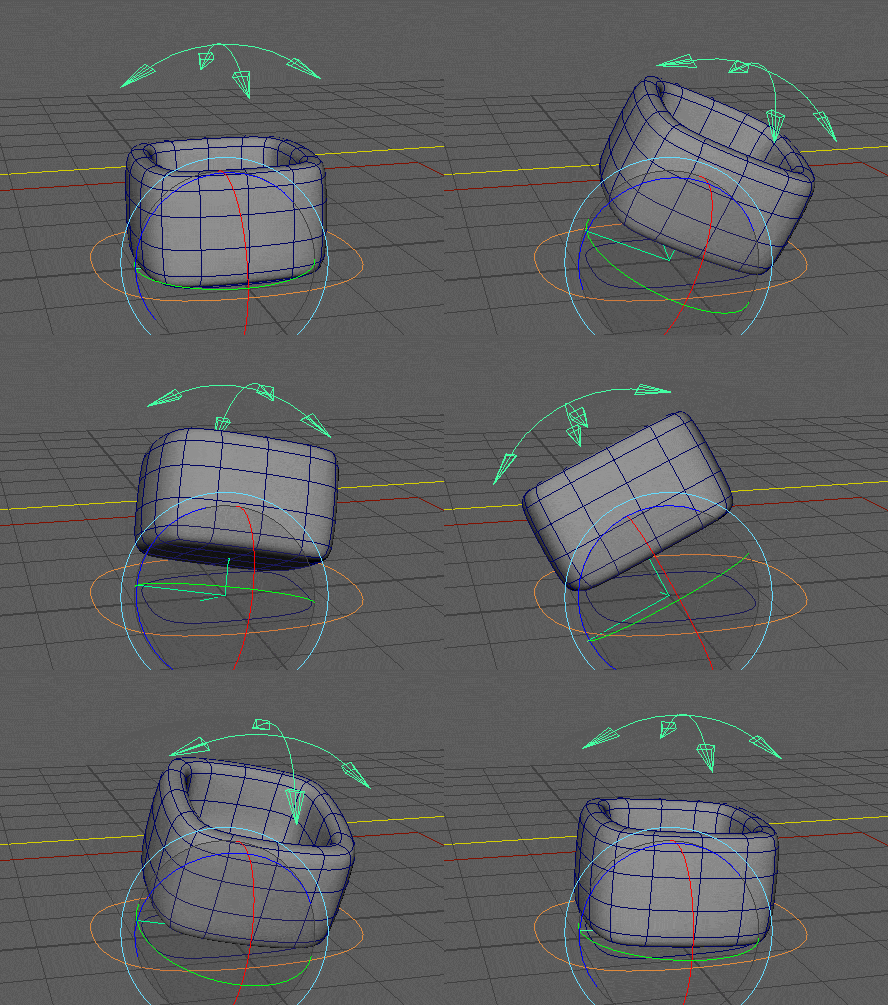
Workflow
- The Footprint Curve: You must model a NURBS curve that represents the base outline or footprint of your object.
- Omnidirectional Banking: When the animator tilts the
targetcontroller, the modifier calculates the direction of the tilt, finds the furthest edge on your curve in that direction, and moves the pivot there. - Axis Locking: Because this is a tilt-based edge-banking system, the "up" axis (twist) is automatically locked on the controller to prevent conflicting pivot math. You only animate the tilt.
Because the modifier automatically duplicates your input curve into the final rig hierarchy, your original reference curve must be kept in a separate geometry or guide group outside of the main rig template.
Parameters
| Parameter | Type | Default | Description |
|---|---|---|---|
target | node | The animation controller that the animator will use to bank the object. | |
node | node | The actual rig node (usually a skin joint or deform group) that will receive the banked matrix. | |
curve | node | The reference NURBS curve representing the object's outline/footprint. The modifier will automatically duplicate it from the provided geometry ID. Use the format cv_name->shape. | |
axis | str | y | The "Up" / Twist axis of the object (x, y, or z). This axis will be locked and non-keyable on the controller, allowing banking purely on the other two axes. |
parent | node | node.parent() | The transform under which the generated technical banking rig will be parented. |
name | str | curve.name | Base name for the generated nodes. Defaults to the name of the input curve. |
Example
Creating an automatic rolling setup for a flower pot. When the animator rotates the pot_bank::ctrls in X or Z, the pivot will automatically shift to the edge defined by the cv_pot shape, preventing the pot from clipping through the floor.
rig.bank:
  curve: cv_pot->shape

  parent: pot_bank::roots.0
  target: pot_bank::ctrls.0
  node: pot_bank::skin.0
To see this exact setup in action and explore the generated hierarchy, download the mod_bank.ma demo scene from our Google Drive folder.