rig.muscle
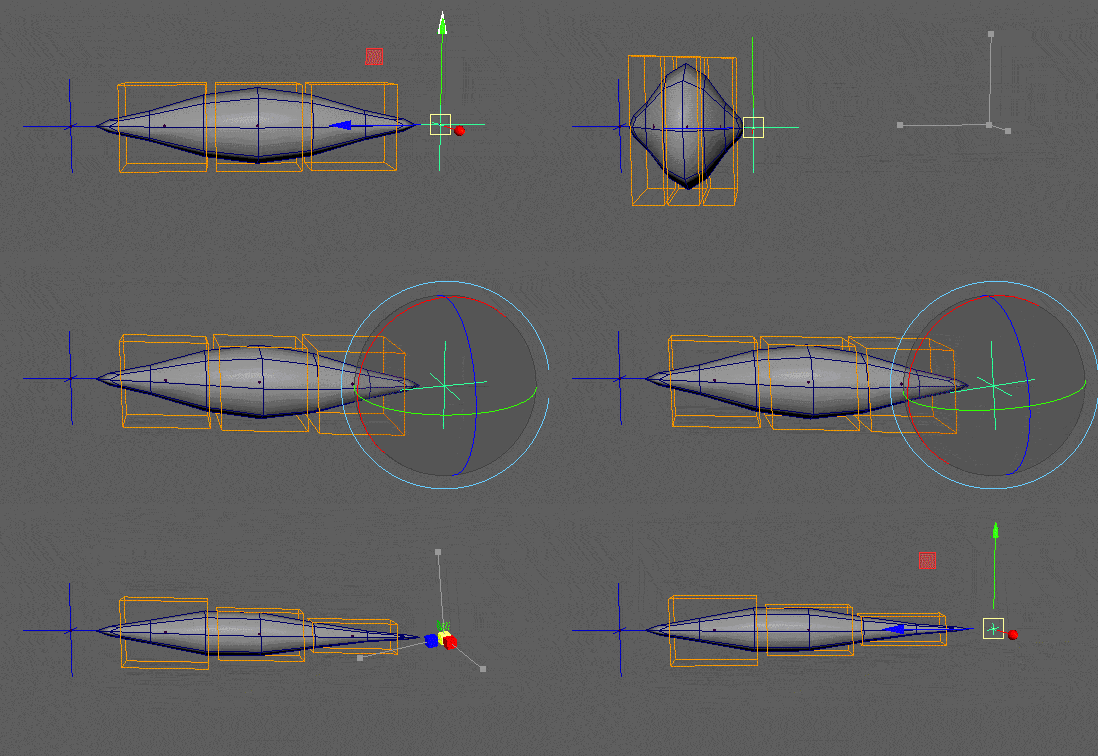
Builds a procedural muscle rig that automatically stretches, squashes, and shears between target points.
This modifier is incredibly versatile. While its primary use case is driving secondary deformation joints to fake muscle volume preservation, it can also be used to constrain entire hierarchies (like a simple body rig). It dynamically calculates the distance and orientation between its "tendon" targets to drive the constrained nodes.
Usage
Depending on how many targets you provide, the modifier automatically adapts its internal math:
- Simple Muscle (2 Targets): Creates a straight, linear stretchy setup between Point A and Point B.
- Spline Muscle (3+ Targets): Automatically generates an underlying NURBS curve and attaches the nodes along it. This allows for complex, curved muscle behaviors (like a jaw muscle or a flexible tube) that respect the tangents of the curve.
Proportional Attachment: During the build phase, the modifier evaluates the initial resting position of each driven node to calculate its automatic attachment ratio. If you constrain multiple objects, they will stretch and twist progressively along the muscle's length, naturally favoring the tendon they are closest to.
Parameters
Core Setup
| Parameter | Type | Default | Description |
|---|---|---|---|
targets | list[node] | The nodes acting as the anchors (tendons) of the muscle. Provide 2 nodes for a linear muscle, or 3+ for a curved Spline muscle. | |
nodes / node | list[node] | self.node | The nodes to be driven by the muscle rig (usually joints or local control groups). |
parent | node | nodes[0].parent | The node under which the technical muscle rig will be parented. |
hook | bool | off | How the driven nodes are attached. If off, they are parented inside the muscle hierarchy. If on, they remain in place and are driven via matrix constraints. |
name | str | Custom name for the muscle rig. Defaults to a combined string of the target names. |
Behaviors & Switches
Adding these parameters to your YAML not only sets their default value but also activates the corresponding math nodes and exposes them as animatable attributes on the generated muscle group.
| Option | Type | Default | Description |
|---|---|---|---|
orient | bool | on | If off, the muscle rig ignores the orientation of the targets and only follows their position. |
scale | bool | on | If off, the muscle rig ignores the scale of the targets. |
stretch | float | 1.0 | Default blend value for the stretch behavior (0 to 1). |
squash | float | Activates Squash math. Default blend value for volume preservation as the muscle compresses. | |
shear | float | Activates Shear math. Default blend value for the shearing effect. Keeps the muscle shape natural when targets twist. | |
weight | float | Activates hook blending. Exposes a weight attribute to dynamically turn the entire muscle effect on or off. |
Outputs
When the modifier runs, it generates a technical hierarchy and exposes controls directly on the driven groups.
Generated Nodes & IDs
For each node driven by the modifier, a parent transform group is generated named mu_<name><index>.
These groups are automatically tagged with the mod.muscle ID (accessible via <tpl>::mod.muscle.0 in other modifiers).
Animatable Attributes
The following attributes are added to the generated mu_<name> group, allowing other modifiers to blend the math on the fly:
@slide(0 to 1): Dynamically moves the driven node along the length of the muscle (or the spline).@stretch(0 to 1): Blends the stretch effect on or off.@squash(0 to 1): Blends the squash volume effect (only ifsquashwas defined in the parameters).@exponent(-2 to 0): Adjusts the pinching/profile of the squash effect (only ifsquashwas defined).@shearing(0 to 1): Blends the shear effect (only ifshearwas defined).@weight(0 to 1): Master blend switch for the matrix hook (only ifhookandweightare used).
Example
Creating a stretchy setup with squash and shear enabled.
rig.muscle:
  targets:
    - point_A::j.0
    - point_B::j.0
  nodes:
    - tweakers::roots.0
    - tweakers::roots.1
    - tweakers::roots.2
  name: muscle

  squash: 1  # Activates the squash system and sets its default to 100%
  shear: 1   # Activates the shear system and sets its default to 100%
To see this setup in action, download the mod_muscle.ma demo scene from our Google Drive folder.